
Before you start
You need a Procountor user who is allowed to create new users, such as a Pääkäyttäjä (main user).Allow paid interfaces
If your organization hasn’t used integrations in Procountor before, turn them on first.- Log in to Procountor.
- Select Hallinta > Yrityksen tiedot > Käyttöasetukset (management > company details > usage settings).
- Under Integraatioasetukset (integration settings), select Salli laskutettavien rajapintojen käyttö (allow use of paid interfaces).
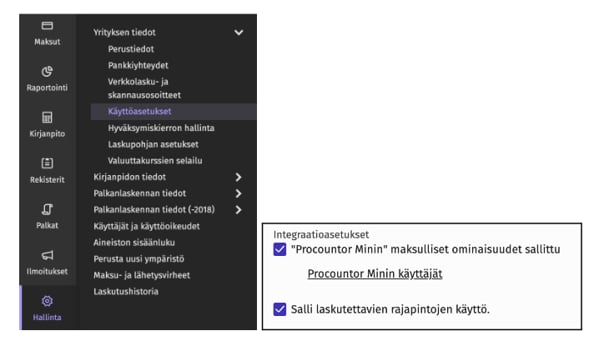
Procountor charges a monthly fee for the integration interface, 13 € a month at the time of writing. The fee is billed by Procountor.
Create an API user
- Select Hallinta > Käyttäjät ja käyttöoikeudet > Lisää uusi käyttäjä (management > users and user rights > add new user).
- Fill in the user details:
- Click Tallenna (save).
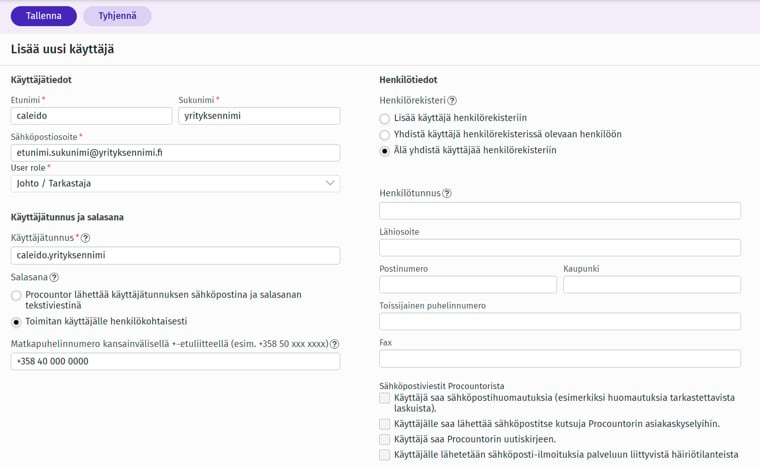
Send the credentials to Caleido
Send the username and the password to your contact person at Caleido in two separate messages:- Username by email
- Password by text message